Thursday, January 30, 2014

Manually Web Application Penetration Testing: Fuzzing - Part 4

Introduction
When we test a web application, we do not test a single page, but a lot of pages of a single web application. Each page may have more than one variable, so technically you will be engaging with a ton of variables during your web application test. So when you inject anything into the input, it is good to know what kind of effect your injection has on the server. In this part of this series of articles, we will look at the importance of simple alphabetic injection along with the web page encoding technology and how it affects our testing and result.

Simple Alphabetic Injection
When you engage with many web pages and a ton of variables, it is good to find your input after you inject. When you give something to the web page as an input, your input will not be used in only one place, but it will be used for many variables and tons of places. One of the common ways to check which areas use a given input is to give a simple alphabetic injection. This simple alphabetic injection can be anything. As I said in an earlier article, I personally use Jonnybravo as a username and momma as a password. If I use any special characters within my input, it might get encoded/eliminated to prevent the injection attacks on that page. What encoding is and how it takes place I will cover later on. The reason for using simple alphabetic injection is because it will never be encoded or eliminated by the server and you can easily find your input within the response as well as the request.


Monday, January 20, 2014

Manual Web Application Penetration Testing: Identifying Application Entry Points

Introduction
In this article, I will show you how to find injection points for your target host and how the webpage is encoded when it comes to the client side from the server.

Identifying Injection Points
If your web page is static, you cannot test it for security concern. You can test it at some sort of view but you can’t play with it much as compared to a dynamic page. The Nikto scanner is a good utility that works best in testing static sites. There has to be some interaction between client and server via login panel, comment section, register page, contact form, and so on.

Friday, January 17, 2014

Manual Web Application Penetration Testing: Introduction

In this series of articles, I am going to demonstrate how you can manually exploit the vulnerability of a web application, compared to using any automation tool, in order to find vulnerabilities in the application. Almost all companies worldwide focus on manual testing of web application rather than running web application scanners, which limit your knowledge and skills and the scope of finding a vulnerability with your testing.
For the whole series I am going to use these programs:
  1. NOWASP Mutiliadae
  2. BURP Proxy

Monday, January 6, 2014

Deliver powershell payload using macro.

In past we saw method of direct shell code execution in Ms word or Excel using macro;but if document is closed then we will lose our shell so we have to migrate to other process and sometimes migration is pick up by AV. So in this tutorial we are going to use powershell payload.

Advantages of this method:-


(1)Persistence
(2)Migration is not needed
(3)AV bypass

(1)First we will generate powershell payload; for this purpose i used SET.You can also used Veil or powersploit.Open SET in terminal & select Social-Engineering Attacks and then Powershell Attack Vectors.Generate Powershell Alphanumeric Shellcode Injector.Fill LHOST & LPORT value.

SET-powershell-payload

Our generated powershell payload is located into /root/.set/reports/powershell/. Rename x86_powershell_injection.txt to x32.ps1.

(2)Now Clone git repository of code

root@bt:~# git clone https://github.com/enigma0x3/Old-Powershell-payload-Excel-Delivery
root@bt:~# cd Powershell-payload-Excel-Delivery/

(3)In Powershell-payload-Excel-Delivery folder; rename RemovePayload.bat to remove.bat. Now you have to host remove.bat and x32.ps1 to web-server.Then open persist.vbs file and change URL of x32.ps1 in line 13,33 to your hosted x32.ps1 `s URL. And now also host persist.vbs to web-server. I used localhost.

hosted-payload

(4)Open Macrocode file from cloned folder & change URL in line 27,82,118 respectively to your hosted x32.ps1,persist.vbs and remove.bat `s URL.Now add this macro code into excel document as mentioned in previous tutorial.

(5)And last step is setup listener.

metasploit-listener

Now send this document to victim , as soon as he open document and run macro we will get shell. Once the payload is ran, it runs in the powershell process, so if the user closes excel, you keep your shell. You also remain in a stable process until reboot, so migration is not needed.

powershell-process

It then pulls down a persistence script, drops it, creates a registry key for autorun for the persistence script. Once done, it also drops a self-deleting bat file that removes the initial payload from the system.

persist using regestiry

Thanks to  enigma0x3 for this awesome method.

Update :- New-Powershell-Payload-Excel-Delivery

This is a VBA macro that uses Matt Graeber's Invoke-Shellcode to execute a powershell payload in memory as well as schedule a task for persistence(20 min onidle  you get shell).
root@bt:~# git clone https://github.com/enigma0x3/Powershell-Payload-Excel-Delivery.git
root@bt:~# cd Powershell-Payload-Excel-Delivery/

Open MacroCode file & change Download URL for Invoke-Shellcode file & change LHOST & LPORT option. Now add macro-code in Excel file & start-up listener.

Tuesday, December 24, 2013

Wireless Attacks Unleashed

As we all know, wireless networks are spread at each and every part of the world, starting from personal home to corporate business environments, schools/universities, cafes, etc. The major merit of wireless networking is to eliminate the big and untidy cables, which acquires space and unspoils the look of your working area. But as we all know, each coin has two sides. There are demerits of wireless networking as well. It comes with high possibility of attacks on it. In this article I am going to describe different techniques of attacks on wireless networks and what we should do to prevent them.

Let’s start with WLAN protocol, which is also known as 802.11 protocol, commonly used for wireless networking. The major function of this protocol is to link more than one device. It uses spread spectrum signals. The functionality of these signals is based on radio frequency communication where networking is established between two point-to-point end devices consisting of a transmitter and a receiver. In this mechanism, participants (in terms of end devices) must have transmitters and receivers to send and receive signals.


To connect to the wireless network, each participant must have wireless AP (Access Point – also known as Wi-Fi hot-spot) along with the wireless adaptor. The AP acts as a walkie-talkie. It converts radio signals into digital signal and vice-versa. When AP transmit the signals, those signals have SSID, known as service set identifier & information of network identification. The receiver detects the signals and lists the available wireless network around him/her, along with the signal strength. Not only this, it also identifies whether the AP is using any security, and if yes, then what is the level of security. As its wireless network, it allows more than one node to let those nodes connect with the network, so that is why authentication is important to ensure there is not any malicious Internet user lying in that network. The AP holds this responsibility.

Wednesday, December 18, 2013

Creating custom username list & wordlist for bruteforciing.

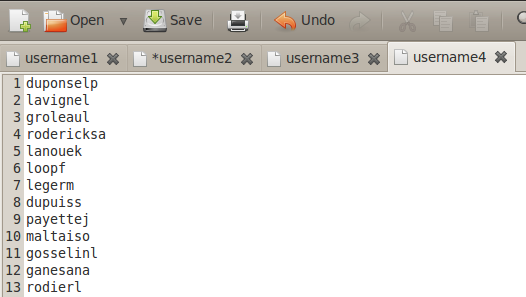
During brute-forcing every time you need custom  password list & username list. Username list is as well as important as password list, it should be unique for every organization.If we use traditional large number of username list , then it will be tedious process.Custom username list also useful in username enumeration.

Creating custom username list:-


(1)Jigsaw:-

During information gathering stage , you may use jigsaw script. It is great script for gathering employees `s details like fullname, position, department, email addresses.You should use script with your jigsaw credential.


some times email address`s initial can be username of employee.So you can get different username from output of jigsaw script.


(2)Username script:-

If you have full name of users then you can use username.py script to generate possible username by using different combination of first name & last name.


I also write bash script which generate possible username using first name, last name & birth date.


Creating Custom word list:-


(1)Cewl:-

Custom Word List generator. CeWL is a ruby app which spiders a given url to a specified depth, optionally following external links, and returns a list of words.


(2)Wyd:-

wyd is a password profiling tool that extracts words/strings from supplied files and directories. It parses files according to the file-types and extracts the useful information, e.g. song titles, authors and so on from mp3's or descriptions and titles from images.


(3)Cupp:-

People spend a lot of time preparing for effective dictionary attack. Common User Passwords Profiler (CUPP) is made to simplify this attack method that is often used as last resort in penetration testing and forensic crime investigations. A weak password might be very short or only use alphanumeric characters, making decryption simple. A weak password can also be one that is easily guessed by someone profiling the user, such as a birthday, nickname, address, name of a pet or relative, or a common word such as God, love, money or password.

Wednesday, December 11, 2013

Everything About Linux Iptables/Linux Firewall

Introduction
Firewalls are used to monitor and control the inbound and outbound traffic on the protected network. They have an ability to block and allow the internal as well as external services within the network. Before allowing access to the service, a firewall may also force the client / user to pass through an authentication. Sometimes a firewall can be also used in IPSEC tunnels as a platform. It monitors security-related events.

Packet Filtering
The packet filtering mechanism mainly contains inspection on TCP/IP and UDP packets. It also includes all ports in its inspection. In this process, certain rules are written for allowing and rejecting the packets passing through the network. The rules written in the firewall may contain TCP and UDP port numbers, source and destination addresses. One can implement firewall rules which may work in both inbound and outbound directions.

Types of Firewalls
There are basically four types of firewalls:
  1. Packet Filter Firewall
  2. Stateful Packet Filter Firewall
  3. Circuit Level Gateway
  4. Application Level Gateway
Packet Filter Firewall
This firewall comes into play when an administrator wants only certain packets to enter into the protected network. In this case, each packet will be monitored and inspected before passing through the network, and after monitoring and inspecting, the firewall will decide whether to let it pass or not.


There are two types of packet filter mechanisms:
  1. Stateful Packet Filtering
    These types of firewalls are known as a smart / clever firewall. If the firewall remembers the packets it allowed and blocked in the network, then it is known as Stateful packet filtering. Sometimes it is also called a dynamic packet process.
  2. Stateless Packet Filtering
    In this case, information about all those previous packets passed through the networks is not being remembered by a firewall. This type of firewall can be bypassed and easily fooled by attackers, and is especially dangerous for UDP data packets. This firewall will never come to know whether the given packet is a part of existing connection or any rough useless packet, because it isolates each and every packet.
  3. Stateful Filter Firewall
    I have already mentioned about the Stateful packet filtering process in the above section. Additionally, this type of firewall keeps a track record of TCP streams to inspect each and every packet passing through and in and out of the network. Generally this type of firewall is only constructed to inspect packets which are coming in only one direction, from client to server. There is an automatic process which handles counter requests (replies) going from server to client. It has an ability to support a wider range of protocols such as IRC, FTP, etc…


    TO READ FULL ARTICLE ALONG WITH PRACTICAL IMPLEMENTATION OF FIREWALL, CLICK ON BELOW LINK TO VIEW